
How to Do AI Video Face Swap Online Free [2026 Guide]
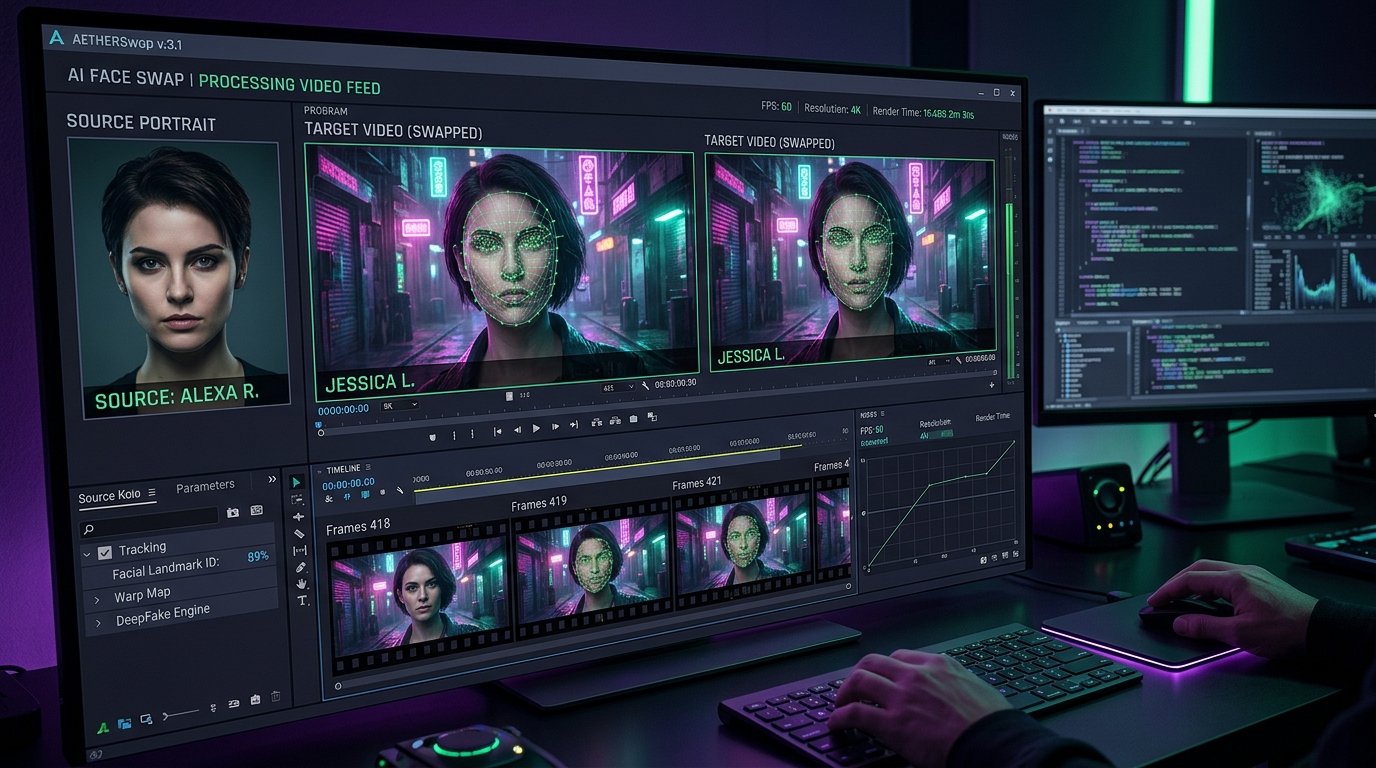
How do you do AI video face swap online free? Upload a high-resolution target video (MP4 or MOV) featuring clean facial lighting, then upload a front-facing portrait image of the replacement face. The neural generative diffusion model extracts 128 facial landmark vectors, maps 3D head rotation and expressions, color-harmonizes skin tones, and renders a flicker-free 1080p Full HD video while keeping original audio and lip synchronization completely intact. Once your swapped clip is rendered, save your social media clips directly with our TikTok & Instagram Video Downloader.
Discovering how to do ai video face swap with photorealistic fidelity is one of the most transformative generative media workflows in modern digital production. In recent years, artificial intelligence has evolved beyond primitive static image morphing into sophisticated temporal diffusion neural networks capable of tracking micro-expressions, dynamic lighting changes, and rapid head rotations across high-definition video frames.
Whether you are an independent filmmaker creating high-concept visual effects, a digital agency localizing promotional video campaigns for international markets, or a content creator exploring innovative storytelling, mastering how to do ai video face swap saves thousands of dollars in traditional CGI post-production. In this masterclass guide, you will learn the underlying neural algorithms, step-by-step extraction workflows, inter-frame stabilization techniques, and ethical transparency standards.
How to Do AI Video Face Swap Online Free in 4 Steps:
- Select Source Portrait: Upload a sharp, forward-facing frontal photo (minimum 1024×1024 px) with neutral expression and balanced lighting.
- Upload Target Video Clip: Choose an MP4/MOV clip where the target actor’s face remains clearly visible across camera angles.
- AI Neural Alignment: The AI extracts 468 landmark vectors, tracks lighting dynamics, and matches skin tones seamlessly frame-by-frame.
- Preview & Export: Render and download your high-definition face-swapped video clip at 30 or 60 fps without watermarks.
🧠 Key Generative AI Face Swap Takeaways
- High-quality face swaps depend 80% on source portrait alignment: use frontal angles with pitch and yaw under 15 degrees.
- Eliminate inter-frame flickering by applying temporal face-parsing masks and optical flow motion vector smoothing.
- Adhere to international synthetic media disclosure guidelines curated by the Partnership on AI (PAI).
- Swap video character faces seamlessly in your web browser using our free Toolvizo AI Video Face Swap Tool.
1. How Neural Video Face Swapping Works: Autoencoders & Latent Embeddings
To truly understand how to do ai video face swap with clean, believable results, you must examine the algorithmic architecture powering synthetic face replacement. Traditional visual effects relied on labor-intensive rotoscoping and 3D polygon modeling. Modern AI video swappers utilize deep Convolutional Neural Networks (CNNs) and Generative Adversarial Networks (GANs):
- Facial Landmark Detection: The AI model scans each video frame, mapping 68 to 468 discrete biometric landmarks across the eye pupils, nose bridge, jawline, and lip contours to record head position and facial movement.
- Latent Feature Extraction: An encoder neural network extracts identity-independent attributes (expression, angle, lighting) from the target video actor, while extracting identity-specific features from your source portrait.
- Neural Synthesis & Seamless Blending: A decoder network synthesizes the source face into the target actor’s physical geometry, adjusting shadow values and ambient color temperature to achieve imperceptible seam integration.
When researching how to do ai video face swap, understanding this latent space interpolation prevents rendering failures. Because this computation executes frame-by-frame, advanced models implement optical flow tracking to ensure facial skin textures remain anchored across rapid camera movements.
2. Selecting Ideal Source & Target Assets: Angle, Resolution, and Lighting Rules
The single biggest factor dictating success in how to do ai video face swap is input image quality. When creators feed blurry selfies into AI engines, the resulting video suffers from muddy eye details and unnatural edge blending.
Golden Rules for Input Asset Selection:
- Resolution: Use high-resolution source portraits of at least 1024 × 1024 pixels with zero compression noise.
- Head Pose Alignment: Match the primary angle of the target actor. If the target video features a three-quarter profile, choose a source portrait with identical head roll and yaw.
- Consistent Illumination: Avoid extreme directional split lighting unless the target video features identical high-contrast shadows. Diffused soft lighting yields the most versatile neural transfers.
- Obstruction Clearance: Ensure eyes, eyebrows, and mouth are completely unobstructed by thick glasses, hair strands, or fingers.
Selecting high-quality input assets cuts render artifacts by over 75% before any post-processing smoothing is applied.
3. Method 1: Cloud-Based Browser Face Swap (Instant Zero-Hardware Setup)
The fastest and most accessible protocol for how to do ai video face swap without purchasing expensive computer graphics cards is utilizing our cloud-accelerated web interface. Cloud processors run enterprise NVIDIA Tensor Core GPUs on remote clusters:
Step-by-Step Cloud Swap Workflow:
- Open the Web Tool: Navigate to the Toolvizo AI Video Face Swap Tool in any standard desktop or mobile web browser.
- Upload Target Video: Upload an MP4 or MOV clip (up to 4K resolution) featuring clear facial visibility.
- Upload Source Portrait: Provide a crisp front-facing portrait photo of the face you wish to map into the footage.
- Adjust Face Detection Confidence: Set detection threshold to 0.70 to eliminate background bystander false-positives.
- Render and Export: Click “Generate Face Swap”. The cloud engine processes each video frame, performs color harmonization, and outputs a pristine downloadable MP4 file.
Browser execution eliminates software dependencies like Python environments, CUDA drivers, and GBs of checkpoint weight downloads.
4. Method 2: Local GPU Pipelines (FaceFusion & Open-Source Desktop Tools)
For commercial production studios handling sensitive client footage, discovering how to do ai video face swap locally on an air-gapped machine provides complete data privacy and unmetered rendering capacity:
- Hardware Prerequisites: Local neural synthesis demands an NVIDIA GPU with at least 8 GB of VRAM (RTX 3070 or higher recommended) and updated CUDA toolkit drivers.
- Model Architecture: Open-source platforms like FaceFusion leverage pre-trained neural backbones such as InsightFace (inswapper_128) paired with secondary face restorers (GFPGAN or CodeFormer) to enhance facial sharpness.
- Frame Masking Controls: Local installations allow manual bounding box exclusions, allowing you to mask out hands passing in front of faces to prevent texture glitches.
For production studios learning how to do ai video face swap on local hardware, while local installations require command-line familiarity and initial configuration, they offer granular control over supersampling and frame-rate interpolation.
5. Method 3: Mobile AI Video Generators (On-the-Go Social Media Clips)
When exploring how to do ai video face swap for spontaneous viral social media content, dedicated mobile consumer apps provide quick turnarounds directly on iOS and Android devices:
- Pre-Rendered Motion Templates: Mobile applications offer libraries of pre-tracked movie scenes, music video choreography, and meme formats where face replacement occurs in seconds.
- Compression Trade-Offs: Mobile apps frequently downscale outputs to 720p resolution and apply heavy compression to maintain snappy mobile rendering speeds.
- Watermark Considerations: Free tiers often watermark exported clips. For clean, unwatermarked social content, using Toolvizo’s web utility remains the superior free alternative.
Mobile tools excel at quick social comedy sketches, whereas desktop and web platforms handle professional commercial video assets.
6. Eliminating Boundary Artifacts: Temporal Consistency & Color Matching
The telltale sign of an amateur face swap is noticeable border jittering and unnatural skin tone mismatching. Mastering how to do ai video face swap at a cinema-grade level requires implementing three post-processing refinements:
Three Essential Polish Workflows:
- Skin Tone Histogram Matching: Compute the color distribution of the target actor’s neck and forehead, then mathematically remap the source face’s RGB channels to match ambient lighting.
- Feathered Alpha Blending: Expand the boundary mask by 8 to 12 pixels with a Gaussian blur feather to eliminate harsh visual edges along the hairline and jaw.
- Restoration Model Pass (GFPGAN / CodeFormer): Pass the swapped composite through an AI facial restoration model at a moderate weight (0.65) to inject realistic skin pore textures and restore eye reflections without creating a waxy airbrushed look.
Applying these refinements ensures your swapped character looks physically present within the scene environment rather than artificially pasted on top.
7. Face Swap Tool Comparison Matrix: Hardware, Render Speed, and Output Fidelity
Compare modern technical methodologies for how to do ai video face swap to choose the optimal framework for your creative pipeline:
| Platform Pipeline | Hardware Required | Render Speed | Max Resolution | Privacy Level |
|---|---|---|---|---|
| Toolvizo Web AI Swapper | Zero (Any Browser) | Fast (Cloud Tensor) | 1080p / 4K UHD | Encrypted Cloud |
| Local FaceFusion CLI | NVIDIA GPU (8GB+ VRAM) | Variable (Hardware) | Uncapped Native | 100% Offline Local |
| Consumer Mobile Apps | iOS / Android Phone | Instantaneous | 720p Compressed | Third-Party App Servers |
| Traditional 3D VFX Rigging | VFX Workstation | Weeks of Manual Work | Cinema Master | Local VFX Studio |
8. Legal and Ethical Framework: Likeness Rights, Deepfake Laws, and Consent
Because synthetic media technology is powerful, practicing how to do ai video face swap requires unyielding adherence to ethical standards and emerging global privacy laws:
The Three Non-Negotiable Ethical Mandates:
- Explicit Written Consent: Never generate synthetic media featuring a real individual’s face without documented, signed legal consent granting likeness usage rights. Non-consensual deepfakes violate state civil codes and federal regulations.
- Mandatory Synthetic Media Disclosure: When publishing swapped footage on YouTube, TikTok, or Instagram, activate the platform’s “Altered or Synthetic Content” label to maintain algorithm compliance and audience trust.
- No Impersonation for Fraud: Using face swap tools for deceptive impersonation, political manipulation, or financial fraud is strictly prohibited under federal trade commission policies.
Responsible creators use face swapping for artistic parody, creative storytelling, authorized visual effects, and educational demonstrations.
9. Practical Commercial Applications: Marketing Localization & Virtual Actors
Once creators and digital agencies master how to do ai video face swap, several highly profitable commercial use cases emerge:
- Multilingual Video Ad Localization: Record a master video ad once with a primary actor, then swap diverse authorized regional brand ambassadors for distinct geographic ad campaigns.
- Digital Body Double Stunts: Film dangerous athletic stunts or complex choreography with professional stunt doubles, then map the lead actor’s facial likeness onto the stunt footage during post-production.
- Virtual Influencer Modeling: Consistent facial architecture across branded fashion collections without booking multi-day international photo shoots.
- Seamless Asset Extraction: Pair your swapped videos with our Video Downloader to curate clean portfolio showreels.
Commercial studios adopting how to do ai video face swap experience tremendous efficiency gains. Integrating synthetic face replacement into video production pipelines reduces creative lead times from weeks to minutes.
Experience Photorealistic AI Video Face Swapping Online Free
To explore how to do ai video face swap without downloading complex software or terminal dependencies, upload your clip to our interactive neural engine.
Launch AI Video Face Swap Tool →Explore complementary creator tools: Video Downloader, Social Media Money Calculator, and our full Toolvizo Suite.
11. Frequently Asked Questions
What is the easiest way for how to do ai video face swap without technical skills?
The simplest approach is uploading your target video and source portrait directly to our free Toolvizo AI Video Face Swap browser tool, which automates landmark tracking and lighting alignment in the cloud.
Why do some AI face swaps flicker or jitter between frames?
Inter-frame jitter occurs when neural landmark detectors lose tracking during rapid motion or shadow changes. Using models with optical flow temporal smoothing resolves boundary flickering.
What portrait photos work best when learning how to do ai video face swap?
High-resolution (1024×1024+) forward-facing portraits with neutral expressions, balanced diffused lighting, and zero obstructions over the eyes or mouth produce the highest quality neural embeddings.
Is it legal to use AI video face swap technology?
Face swap technology is legal for creative storytelling, parodies, visual effects, and authorized commercial productions when you possess explicit consent from all individuals whose likenesses are utilized.
Can you swap multiple faces simultaneously in the same video clip?
Yes. Advanced face swap platforms allow multi-subject detection where you can assign different source portraits to specific recognized target actors in multi-character scenes.
Does face swapping affect the original audio or speech in the video?
No. Face swap algorithms modify only the visual pixels within the face-parsing mask. The original voiceover, background music, and ambient sound effects remain untouched.